Why Enterprise Businesses Are Switching to Client-Side PDF to Word Converters
Companies converting invoices and legal templates face a critical compliance problem: uploading those documents to legacy cloud servers violates strict HIPAA, GDPR, and SOC 2 data retention policies. Client-side PDF to Word conversion running natively in the browser sandbox eliminates this risk entirely.
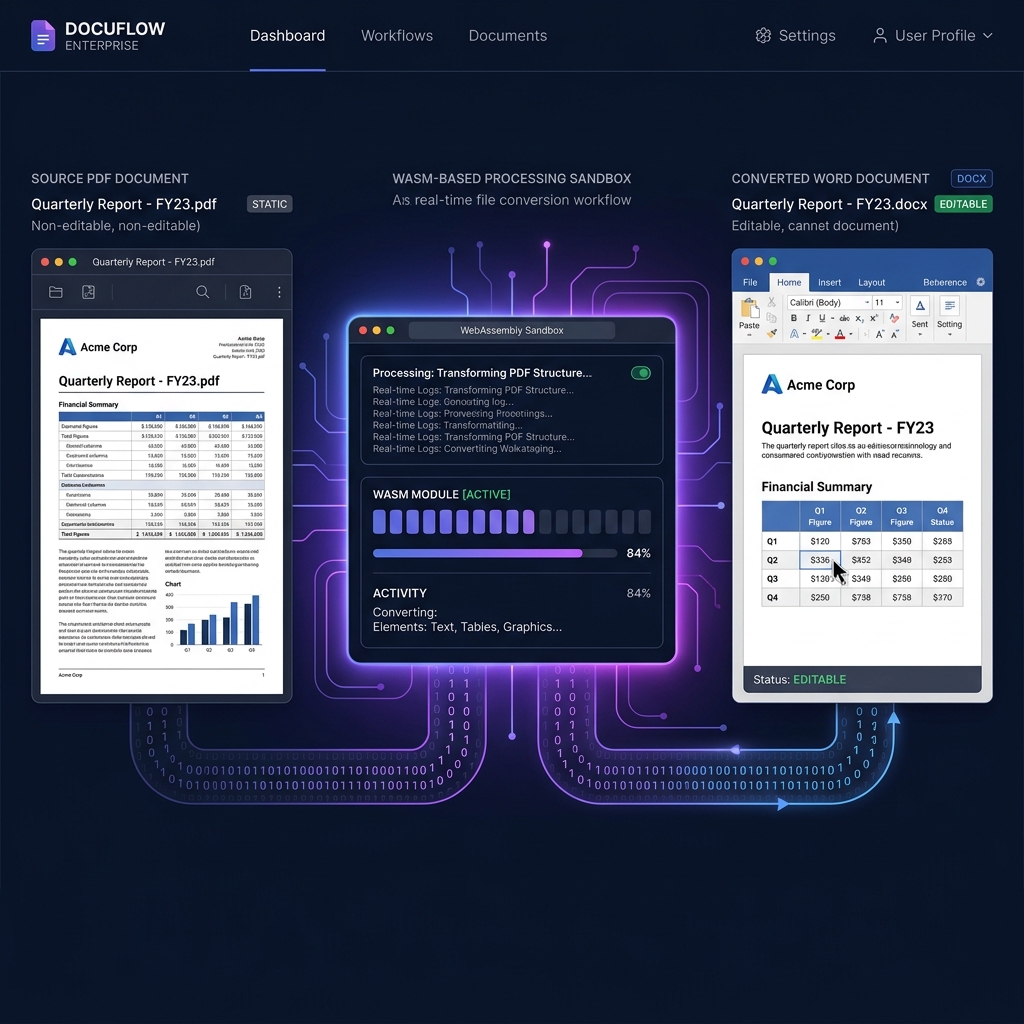
A PDF doesn't know what a "paragraph" is. A Word document is built almost entirely out of them. That mismatch is why so many PDF-to-Word converters produce a document that looks right at a glance and falls apart the moment you try to edit a table. It's also, less obviously, why the compliance case for client-side conversion and the quality case for it point in the same direction — both come down to what the engine is allowed to do with your document's structure, and where.
For legal teams editing master contract templates, HR departments updating employee handbooks, or finance departments extracting invoice data into editable forms, the operational friction is universal: the source document lives in a locked PDF, and every tool capable of unlocking it demands a cloud upload of your most sensitive corporate data.
Why PDF to Word Conversion Has Always Been an Architectural Problem
The root cause of poor conversion quality—and the reason most tools destroy formatting—is a fundamental architectural mismatch between the PDF specification and the Word document model.
A PDF is a static two-dimensional vector map. It does not encode the concept of a "paragraph," a "table column," or a "heading hierarchy." Instead, it stores explicit coordinate commands that instruct a rendering engine where to draw ink on a fixed canvas. Every character, line, and image is positioned by absolute X/Y coordinates within a page boundary.
A Microsoft Word document (.docx) is the exact opposite: a dynamic, flow-based XML schema defined by ECMA-376 (Office Open XML). Text reflows based on margin and container rules. Tables define relational rows and columns. Headings map to a semantic document outline. When a naive conversion engine attempts to bridge this gap, it reads the raw text strings sequentially and dumps them without spatial context, producing broken paragraphs and collapsed table structures.
[PDF: Static Vector Map]                   [Word: Dynamic XML Flow]
──────────────────────                     ──────────────────────────
x:72, y:140, text:"Revenue"       vs.      <w:tbl><w:tr>
x:280, y:140, text:"$1,200,000"              <w:tc><w:p><w:r><w:t>Revenue</w:t>...
x:72, y:165, text:"Expenses"                 <w:tc><w:p><w:r><w:t>$1,200,000</w:t>...
x:280, y:165, text:"$940,000"              </w:tr></w:tbl>
The critical conversion challenge is inferring the relational structure of a Word document from the purely positional data of a PDF. Doing this accurately requires a spatial intelligence algorithm—not a simple string dump.
The Compliance Risk of Cloud-Based PDF Converters in Enterprise Environments
The dominant solution for years has been server-side processing: upload your PDF to a cloud platform, let its backend run the conversion algorithms, and download the resulting .docx file. This workflow appears frictionless on the surface but creates a catastrophic data chain-of-custody problem for any regulated industry.
[Corporate PDF]  ──( Outbound WAN Upload )──►  [Third-Party Cloud Server]
                                                         │
                                            ┌────────────▼─────────────┐
                                            │  Scanned by Server Logic  │
                                            │  Cached in Storage Layer  │
                                            │  Conversion Job Queued    │
                                            └────────────┬─────────────┘
                                                         │
                                            ◄──( DOCX Download Link )──
The moment a corporate document leaves the local network boundary, the enterprise loses full control over its data. When server-side deletion scripts fail on third-party hardware—a routine occurrence in high-traffic SaaS infrastructures—the unencrypted corporate document remains indefinitely cached outside the organization's governance perimeter, exposing the business to immediate regulatory action and audit failures.
The Dynamic Coordinate Grid Bounding Algorithm: How Local Conversion Works
Utilitly's client-side PDF to Word engine solves both the compliance and quality problems simultaneously through a multi-stage local processing pipeline powered by WebAssembly. When you drop a PDF onto the conversion canvas, the file is captured as a raw ArrayBuffer in the browser's local RAM. This binary is written directly into the WASM instance's linear memory space. No network packet leaves the browser tab at any point.
The conversion quality problem is solved by the Dynamic Coordinate Grid Bounding Algorithm, which operates in four discrete stages within the isolated browser sandbox:
[PDF ArrayBuffer in WASM Memory]
         │
         ▼
┌────────────────────────────────────────────────┐
│  Stage 1: Spatial Cluster Analysis             │
│  Group X/Y coordinates into horizontal bands  │
│  → Identifies line rows and text blocks        │
├────────────────────────────────────────────────┤
│  Stage 2: Grid Boundary Detection              │
│  Detect vector line segments & whitespace gaps │
│  → Rebuilds table cell bounding boxes          │
├────────────────────────────────────────────────┤
│  Stage 3: Semantic Structure Inference         │
│  Map font-weight, size & position to heading   │
│  hierarchy (H1/H2/H3) and body paragraphs      │
├────────────────────────────────────────────────┤
│  Stage 4: Word XML Schema Compilation          │
│  Emit OOXML-compliant .docx binary with        │
│  proper w:tbl, w:p, w:r, and w:t elements      │
└────────────────────────────────────────────────┘
         │
         ▼
[Local Blob URL] ──► [Instant DOCX Download]
By operating on spatial cluster analysis rather than linear string extraction, the algorithm correctly identifies multi-column layouts, nested tables, header rows, and indented paragraph structures—preserving the visual logic of the original document as a proper semantic Word schema.
Enterprise Architecture Comparison: Cloud Converters vs. Client-Side Execution
| Evaluation Vector | Traditional Cloud Converters | Utilitly.com Client-Side Engine |
|---|---|---|
| Data Transmission | Full document binary uploaded over WAN | Zero network upload; processed in local RAM |
| GDPR Compliance | Requires DPA with processor; often absent | No third-party processor; natively compliant |
| HIPAA Viability | Requires signed BAA; most tools lack one | No PHI ever leaves local browser sandbox |
| Table Layout Accuracy | Sequential string dump; columns collapse | Grid bounding algorithm; cell structure preserved |
| Processing Latency | Queued on server; varies with traffic load | Near-instant; scaled by local machine CPU |
| Audit Trail Risk | Server logs capture document metadata | Zero external log footprint; browser-only execution |
Which Enterprise Teams Benefit Most From Local PDF to Word Conversion
The compliance and accuracy gains of client-side conversion map directly to specific high-value enterprise use cases:
- Legal & Compliance Teams: Converting executed NDAs, master service agreements, and regulatory filings into editable Word templates without exposing privileged legal content to unaudited cloud processors.
- Healthcare Administrators: Transforming patient intake forms, clinical documentation, and insurance claim PDFs into editable DOCX files without triggering the breach-notification obligations described in the HHS HIPAA Security Rule.
- Finance & Accounting Departments: Extracting tabular financial data from bank statements, audited financial reports, and vendor invoices into structured Word or Excel-ready schemas without uploading balance sheet data to infrastructure that falls outside the scope of an existing SOC 2 Trust Services assessment.
- HR & People Operations: Editing employee policy handbooks, offer letter templates, and performance review frameworks stored as legacy PDFs without cloud data residency risks.
Cost Analysis and ROI: Adobe Acrobat Pro vs Client-Side Utilities
Beyond compliance and data privacy, the shift to client-side architecture fundamentally changes the economics of document processing. Enterprise IT leaders are eliminating massive legacy licensing costs by deploying browser-based utilities for the majority of their workforce who only need to convert or compress documents occasionally.
| Cost Metric (100 Employees) | Adobe Acrobat Pro | Utilitly Pro Tier |
|---|---|---|
| Annual Cost Per User | ~$239.88 ($19.99/mo) | $59.88 ($4.99/mo) |
| Total Annual Licensing | $23,988 | $5,988 |
| IT Deployment Overhead | High (MDM pushing gigabytes of installers) | Zero (Browser-based, zero install) |
| Annual ROI / Savings | Baseline | +$18,000 saved per 100 seats |
Step-by-Step: How to Convert a PDF to Word Locally Without a Cloud Upload
The entire conversion pipeline executes within your browser's isolated runtime. No account registration, no server queue, no data exposure:
- Initialize the Conversion Sandbox: Open your web browser and navigate directly to the PDF to Office Converter on Utilitly.com. The WASM binary preloads silently into your browser's local execution cache on page load.
- Load the Source Document: Drag and drop your target PDF onto the processing canvas. The JavaScript layer captures the file as a raw ArrayBuffer entirely within local browser RAM. At this point, zero bytes have crossed the network boundary.
- Select the Word Output Target: Choose Word (.docx) as your target format from the output configuration panel. This configures the WASM engine to route the spatial cluster analysis output into the OOXML Word XML schema compiler.
- Execute the Local Format Mapping: Click the convert trigger. The engine executes all four pipeline stages—spatial clustering, grid boundary detection, semantic structure inference, and OOXML compilation—entirely within the browser sandbox. The operation completes in seconds regardless of server traffic.
- Download or Vault the Output: The browser generates a local Blob URL pointing to your compiled
.docxbinary. Click to download directly to your local drive, or save it securely inside your encrypted Vault container on Utilitly.com for later access across devices.
The Zero-Trust Standard for Enterprise Document Workflows
The grid-boundary tuning described above is the kind of fix that only surfaces once you're converting real financial statements and legal templates at volume, not synthetic test files — which is a fair test for any converter claiming enterprise readiness. Client-side WebAssembly processing establishes a broader baseline too: every conversion operation is verifiable, every data boundary is auditable, and no document ever leaves the control of the organization that owns it.
Navigate to the PDF to Office Converter on Utilitly.com and run your first enterprise conversion with zero cloud exposure.
Frequently Asked Questions
Will tables and multi-column layouts stay intact when converting PDF to Word?
That's the core problem this engine is built to solve. Rather than dumping extracted text linearly, the Dynamic Coordinate Grid Bounding Algorithm clusters text by spatial position first, detects vector line and whitespace boundaries to rebuild table cells, and only then emits the Word XML — so multi-column layouts and table structure are inferred from the PDF's visual geometry, not guessed from reading order.
Can scanned, image-only PDFs be converted to editable Word text?
Not by this engine as described — the coordinate mapping pipeline operates on the PDF's existing text objects and their positions. A scanned page has no text objects, only an image; converting that to editable text requires OCR, which is a separate processing step from the layout-mapping conversion covered here.
Is the converted DOCX compatible with Google Docs and LibreOffice?
Yes. The output is compiled as standard OOXML per the ECMA-376 specification, the same format Word itself uses, so any application that reads .docx files — Google Docs, LibreOffice Writer, Apple Pages — opens it without a proprietary format dependency.
What happens to embedded fonts that aren't installed on my system?
The Word XML output references fonts by name rather than embedding the font binary itself (unless the source PDF's font is embedded and the engine carries it through). If your system or the recipient's doesn't have that font installed, Word substitutes its own default — visually close in most cases, but not always identical spacing to the original PDF.